


G'day everyone, I've been really busy the past couple of weeks so I haven't had a chance to write a post. I've been busy doing an online course, and setting up a lab environment.
I'm really enjoying doing the course, I only have the write up left to finish. I already knew the practical side to the work, it was mostly the theory I needed to learn. I'll finish the write-up over the holidays.
I've set-up an awesome lab environment, in which I'm going to test numerous networking, server and workstation environments. I'm really excited about having a better lab. It should make testing quick and simple.
If anyone has a suggestion for an environment, or you would like to know how to set-up a certain type of server and or operating system, let me know.
It can be hard to know what information people are after, so any suggestions will be greatly appreciated. You can either leave a comment here or email me.
Thank You, Have a Wonderful Holidays!!!
Cheers Kris
Monday, December 24, 2007
Suggestions Welcome

Friday, January 12, 2007
Setting up OpenBSD as a Gateway/Firewall
Today I setup and tested my first OpenBSD firewall/gateway. I was really fun. Before today I had completed bits and pieces of the setup but not the entire process.
These where the steps I took:
# 1. Install:
Partitions =
Filesystem Size Mounted on/dev/wd0a 150.1M /
/dev/wd0b 383.9M swap
/dev/wd0d 511.9M /tmp
/dev/wd0e 99.9M /var
/dev/wd0f 5120.2M /usr
/dev/wd0g 2048.0M /home
Sets =
bsd - This is the Kernel. Required
base40.tgz - Contains the base OpenBSD system
etc40.tgz - Contains all the files in /etc
# 2. Filtering and Firewalling OpenBSD:
First I Prepared pf: by starting it in rc.conf.local. (I will need to reboot for this to take effect)# echo "#Start PF" >> /etc/rc.conf.local
# echo pf=YES >> /etc/rc.conf.local
Now I need to configure pf.conf: # vi /etc/pf.conf
If you need help creating a pf ruleset please have a look at the following: PF User's Guide, pf(4), pfctl(8), pf.conf(5), pf.os(5), pflog(4), pfsync(4), altq(9).
# 3. Setting up your OpenBSD box as a Gateway
Allow IP forwarding by adding this line to /etc/sysctl.conf configuration file:# echo "net.inet.ip.forwarding=1" >> /etc/sysctl.conf
Now modify the routes on the other hosts on both sides.
Routes can be controlled with routed(8) or OpenBGPD, in the base OpenBSD install.
# 4. DHCP Server
# Configuring the DHCP server, dhcpd# echo "#Start dhcpd" >> /etc/rc.conf.local
# echo 'dhcpd_flags=""' >> /etc/rc.conf.local
# Put the interfaces that you want dhcpd to listen on in /etc/dhcpd.interfaces:# echo rl1 > /etc/dhcpd.interfaces
# Then, edit /etc/dhcpd.conf# vi /etc/dhcpd.conf
# 5. Configuration:
Su'd to root, create /etc/profile and add the content below.
# Configuring profiles:# echo "alias su='su -l'" > /etc/profile
# echo "alias rm='rm -P'" >> /etc/profile
# echo 'if [ "$USER" = root ]; then' >> /etc/profile
# echo 'PATH=/sbin:/usr/sbin:/bin:/usr/bin:/usr/X11R6/bin:/usr/local/bin:/usr/local/sbin' >> /etc/profile
# echo 'PS1="\`hostname -s\`:\`pwd\`# "' >> /etc/profile
# echo 'else' >> /etc/profile
# echo 'PATH=/bin:/usr/bin:/usr/X11R6/bin:/usr/local/bin:/usr/local/sbin:/usr/games:.' >> /etc/profile
# echo 'PS1="\`hostname -s\`:\`pwd\`$ "' >> /etc/profile
# echo 'fi' >> /etc/profile
Then I rebooted the system, so that all of the above could take effect. I attached a couple of nodes to the switch, which worked perfectly.
Now I am testing the setup. So far everything is working well :)
I'm not sure how I went, I think I did ok for a first try. If anyone has any suggestions I would be more than willing to hear them. Thank you!
Tuesday, January 09, 2007
Learning TCP/IP
I have been spending the past couple of days reading information on the TCP/IP protocol suite. I want the key concepts and ideas to be knowledge in my mind. See I believe that there is a point when learning where; the things that you are reading, studying and thinking about, become things that you know, and the knowledge is secured into you mind.
It can take a while for this to happen, with somethings, yet eventually the knowledge becomes Your knowledge.
I started out by studying the following RFC's:
RFC 790 - Assigned numbers
RFC 791 - Internet Protocol:
RFC 793 - Transmission Control Protocol
RFC 1122 - Requirements for Internet Hosts - Communication Layers
RFC 1123 - Requirements for Internet Hosts - Application and Support
RFC 1180 - TCP/IP tutorial
Also if you are looking for a really good explanation of the OSI reference Model then wikipedia has one here: OSI model From Wikipedia
I started reading The TCP/IP Guide; from chapter: Networking Fundamentals. This is a very fully on book about TCP/IP. I am enjoying reading it, even though at times it feels a little flowery, and I think that some of the explanations could have been a little clearer. Yet I understand how hard it is to make a complex subject manageable.
I hope to continue reading through this guide today. It will take me a while to get through I imagine.
Saturday, December 30, 2006
My Experiences with DD-WRT
I was reading today that DD-WRT (the free firmware that originally ran on Linksys's WRT54G router) is now available for x86 machines so I thought that I would give it a try. For more information on DD-WRT please see: DD-WRT on a standard X86 pc, and DD-WRT.com.
Installing DD-WRT
To install DD-WRT from Windows please see: DD-WRT on a standard X86 pc.
To install DD-WRT from a UNIX-like system you will need: An x86 compatible pc (i386) or greater with at least 16MB of RAM, 2 network cards, and a hard drive. Also you need to download this image: dd-wrt_public_vga.
To install DD-WRT you need a way of writing the image onto the hard drive you are going to use. I decided to use a LiveCD and dd(1) the image off the usb key. So after downloading the image I placed it on a usb key.
I booted my chosen LiveCD: TrueBSD. Then I inserted my usb key, made a directory in /mnt and mounted the usb key:# mkdir /mnt/usb
# mount -t msdos /dev/da0s1 /mnt/usb
I changed directory into /mnt/usb, and wrote the dd-wrt image to the hard drive:# cd /mnt/usb
# dd if=dd-wrt_public_vga.image of=/dev/ad0
22528+0 records in
22528+0 records out
11534336 bytes transferred in 40.308342 secs (286153 bytes/sec)
Then I unmounted the usb key and rebooted, taking out the livecd.# cd /
# umount /mnt/usb
# shutdown -r now
My Impressions
Well this was a disaster for me I don't know how you will go, but after a couple of hours of total frustration I wiped the hard drive. The errors produced where amazing, varied, and did not stop. No matter how many different things I tried I could not get to the stage of accessing the web front end. For a while I couldn't even get a login prompt. After searching for answers and solutions I felt totally disheartened. I don't very often give up on things, yet this was beyond me. I just could not get this to run. Maybe it was just my hardware?
I hope that others have more luck than I had! Yet I don't think I'll will bother with DD-WRT. To much work for no reward.
Monday, November 20, 2006
Device hell
After installing my new DVD player, and a new network card I seem to be in device hell on my Ubuntu (edgy) desktop. The DVD player has a different name every time I boot. Yet more annoying than this is my new network card, which can't make up it's mind weather it is eth1 or eth2. I can't get it to be stable, it changes every time I boot, and messes up my iptables script, and many of my other tools.
I am going to do a re-install. I can't see any other way to get the kernel to pick up the devices properly. I am thinking that I maybe better off with a different OS.
Wednesday, November 15, 2006
Dia
I have been busy the past couple of days getting my life on track, and also playing with my new firewall. I have been going walking 2 times a day, which is scary. Yesterday I had a bit of a play with NetBSD Live. It is based on NetBSD 4.0_BETA/i386. It runs a KDE desktop environment, and there are a few configuration steps to go through to run it. For more info please see the following links: NetBSD Recent changes, READMES in English and German.
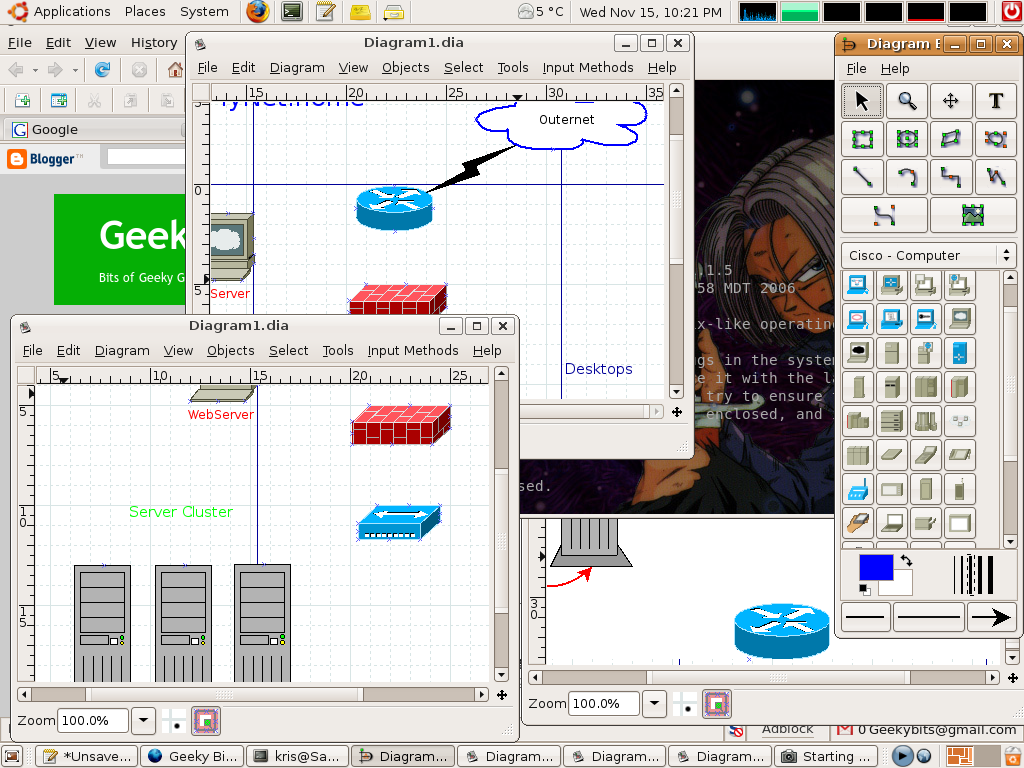
Inside of NetBSD live there was a really cool little program called Dia Which is a diagram creation program. Dia is a gtk+ based diagram creation program released under the GPL license. I love this program, you can draw diagrams of SO many things.
It currently has special objects to help draw entity relationship diagrams, UML diagrams, flowcharts, network diagrams, and many other diagrams. It is also possible to add support for new shapes by writing simple XML files, using a subset of SVG to draw the shape.So if you are drawing heaps of diagrams all the time, or even if you only draw them occasionally this program is very much worth a look. It can make your design time much shorter.
This screen shot is of me working on a dia drawn network diagram.
Have fun.
Sunday, November 12, 2006
Learning Networking, OpenBSD style
I have only been learning OpenBSD for the past couple of weeks, so I am still eagerly learning how the Networking side of things works.
Until today I have never looked much into pf. I have used IPFW2 and IPF many times, and iptables a bit, but never pf. I started out with the information in the OpenBSD FAQ. I always find that this is a good place to start. Then the man pages available on the subject
Reading: I started out with the OpenBSD FAQ Networking section:
http://openbsd.org/faq/faq6.html
As well as investigating the following pages:
lo(4);
The loop interface is a software loopback mechanism which may be used for performance analysis, software testing, and/or local communication.
pflog(4);
The pflog interface is a pseudo-device which makes visible all packets logged by the packet filter, pf(4). Logged packets can easily be monitored in real time by invoking tcpdump(8) on the pflog interface, or stored to disk using pflogd(8).
sl(4);
The sl interface allows serial lines to be used as network interfaces using the slip protocol
ppp(4);
The ppp interface allows serial lines to be used as network interfaces using the Point-to-Point Protocol (PPP).
tun(4);
The tun driver provides a network interface pseudo-device. Packets sent to this interface can be read by a userland process and processed as desired.
enc(4);
The enc interface is a software loopback mechanism that allows hosts or firewalls to filter ipsec(4) traffic using pf(4).
bridge(4);
The bridge device creates a logical link between two or more Ethernet interfaces or encapsulation interfaces
vlan(4);
The vlan Ethernet interface allows construction of virtual LANs when used in conjunction with IEEE 802.1Q-compliant Ethernet devices.
gre(4);
The gre network interface allows tunnel construction using the Cisco GRE or the Mobile-IP (RFC 2004) encapsulation protocols.
gif(4);
The gif interface is a generic tunnelling pseudo-device for IPv4 and IPv6.
carp(4);
The carp interface is a pseudo-device which implements and controls the CARP protocol. carp allows multiple hosts on the same local network to share a set of IP addresses.
tcpdump(8);
tcpdump prints out the headers of packets on a network interface that match the boolean expression.
pflogd(8);
pflogd is a background daemon which reads packets logged by pf(4) to a pflog(4) interface, normally pflog0, and writes the packets to a logfile (normally /var/log/pflog) in tcpdump(8) binary format.
pf(4);
Packet filtering takes place in the kernel. A pseudo-device, /dev/pf, allows userland processes to control the behaviour of the packet filter through an ioctl(2) interface.
ioctl(2);
The ioctl() function manipulates the underlying device parameters of special files. In particular, many operating characteristics of character special files (e.g., terminals) may be controlled with ioctl() requests.
pf.conf(5);
The pf(4) packet filter modifies, drops or passes packets according to rules or definitions specified in pf.conf.
altp(9);
altq - kernel interfaces for manipulating output queues on network interfaces
Wednesday, November 08, 2006
My New DLink router
I received a graduation and an early birthday present today! I love it so much, it is a DLink DSL-504T router. I have the Greatest best friend in the world!
I thought at first it was going to be a world of pain and disasters, but everything turned out ok in the end. Here is the story;
I excitingly unpacked the present from the box and plugged everything in, booted into my desktop, loaded up the router's web interface in my browser and started playing with the configs.
At first there wasn't a problem, I did a default pre-configuration and tested connectivity, everything looked sweet so I continued tweaking settings here and there. Once I had everything the way I wanted it; I rebooted the router and my desktop.
Everything was going along really well, for around an hour or so, (I was impressed with the speed and all my boxes where happily enjoying the ride. I knew that my old router was getting pretty bad, I just didn't realise how bad.)
When all of a sudden the router stopped routing...
Everything stopped, no connectivity anywhere, in anyway. I did some testing and found nothing. None of my settings had changed, nothing seemed wrong, all of the logs where fine, all of the configs where fine all of the lights where blinking just right. I was stumped, not a single idea entered my head, not one.
So I went back to the store with my best friend and replaced the dodgy one with another one. I was worried about the new one straight away, there was no plastic around the box. It had already been opened and the box was slightly damaged. Yet it was the only one they had left in stock. So I wandered home and plugged in the new router, I went to configure it when I noticed that the settings where not default, no the last guy who returned it had left his settings and password in the router. I decided that this was probably a really bad sign.
I reset the router and added my settings, but it was a failure, there was no nothing, the connection was not working at all. It was dead in the water from before it landed in my home.
I stormed down to the store, a little 'pissed off' and spoke to the people there they returned my money, they where really nice about it. My friend and I then wondered along to another computer store to discover that the only router in there was the exact same type as the one we had just taken back.
After slightly scaring a young man in there over being able to bring it back if it was like the last two, we paid $18 more and purchased the router. I checked the batch and serial numbers it was not even close to the same. I hoped that was a good sign...
I plugged it in (by this stage I knew exactly where everything was and where it needed to go, so it was very quick), I added all my settings, and guess what...
it didn't go... I sat and pondered my navel for a while.
Then it came to me... in one last effort to get the router before this one going I had modified the DNS settings on my desktop... opps, so I changed these settings back to my ISP's DNS servers and away it went.
This router is awesome, I love it. I am glad that I didn't go for another brand, I thought about it but now I am so happy to have this one.
I have the coolest best friend. None of these weird graduation gifts, no flowers (which would just die), or pendants (which I will never look at again), no none of that, the most perfect gift you could give a Network Engineer and Sys admin a: DLink Router.
I am so lucky...
Thank you.
Thursday, November 02, 2006
The things that I have learnt today
As the day is drawing to a close, I like to look over the things that I have read about and learned through out the day. This helps to clarify these things in my mind and also to have a reference for further study.
RFC exploration, I read through the following RFC, a couple of times to gain a good understanding of it:
RFC0001 : Host Software, S. Crocker [ April 1969 ] (TXT = 21088 bytes)
Man Pages, I had a bit of a re-read of the following man pages:
netstat(1), ifconfig(8), carp(4)
Wikipedia, I read the following wikipedia pages:
IMP, IP address, IPX, AppleTalk, RPC
I also started to read: Understanding IP Addressing
Overall I am trying to gain a better understanding of my area of interest. I have recently completed my Network Engineering and Systems Administration diplomas and I don't feel that I know my subjects as well as possible. I think in the school environment you get way to caught up in the format of the work (i.e. layout of assignments, and documents), in project management and other matters, which are not necessarily important in gaining knowledge in the area. Therefore I believe that I now need to make sure that my knowledge is sufficient. I will admit that I possibly have way higher expectations on myself than is sometimes necessary. :)